平面銑削表面粗糙度控制:修光刀、振擺與進給
平面銑削的表面粗糙度主要受修光刀刀片、切削刀振擺精度與進給量影響。透過修光刀(Wiper)再次切削可有效改善表面品質;控制刀具振擺與進給條件則能降低粗糙度、延長刀具壽命。掌握「震動控制+刀具配置+進給設定」三大關鍵,是提升面銑表面精度的核心。
一、影響表面粗糙度的因素
| 因素 | 說明 |
|---|---|
| 刀具幾何 | 副切削刃、刀片型式影響殘留高度 |
| 切削震動 | 震動大→粗糙度上升、崩刃 |
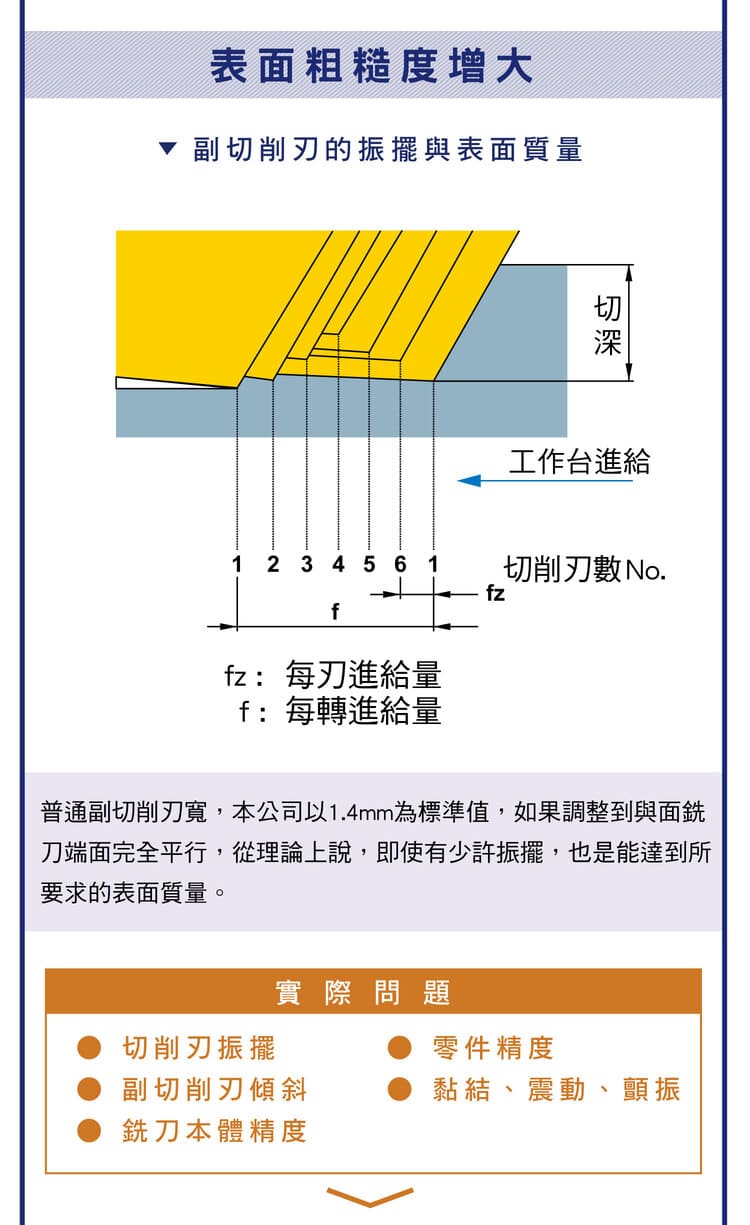
| 進給量 | 進給越大、粗糙度越高 |
| 刀具配置 | 修光刀、刃數與安裝穩定性 |
核心目標:降低表面粗糙度、穩定加工品質。
二、修光刀刀片(Wiper Insert)
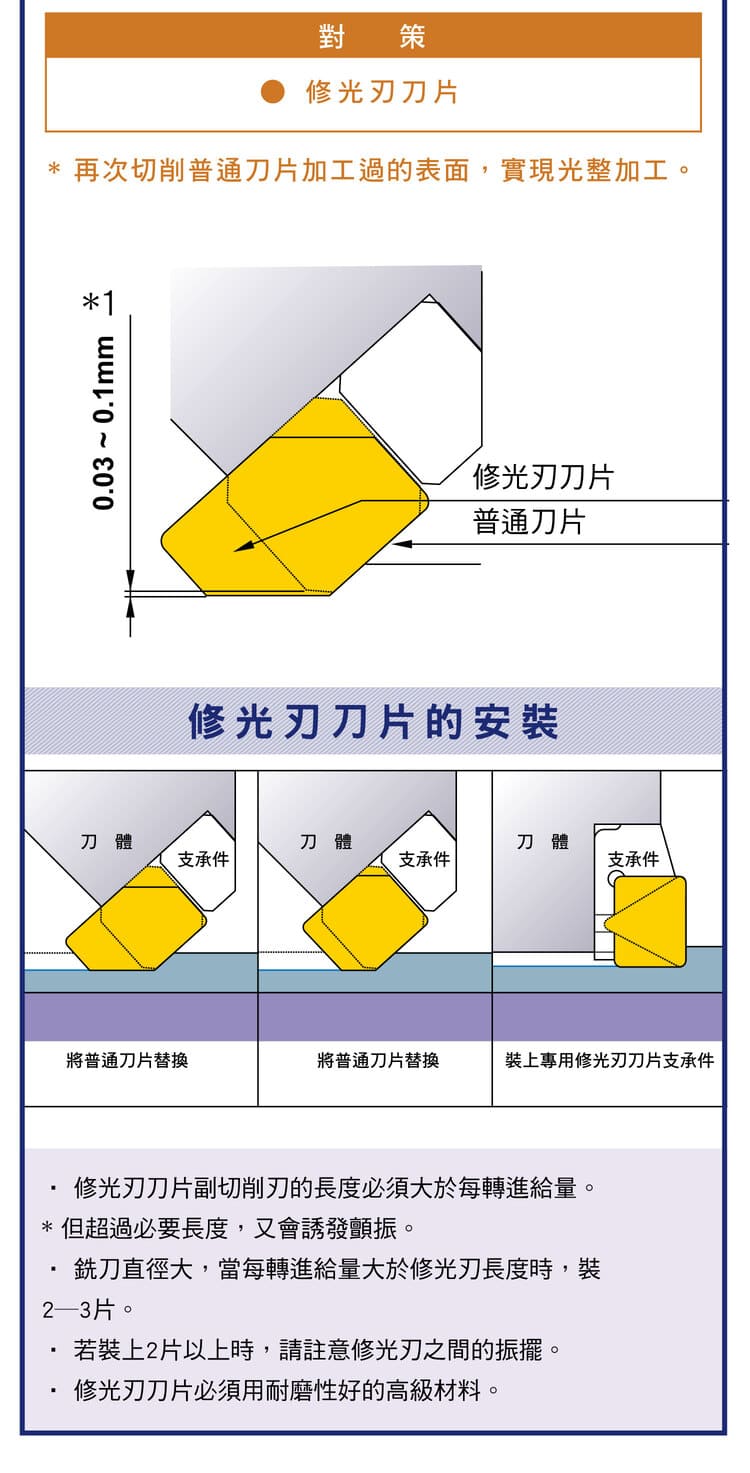
修光刀對已加工表面進行「再次修整」,可實現光整加工。修光長度約 0.03~0.1 mm。使用重點:
修光刀的修光長度需大於進給量,才能覆蓋刀痕;過長易產生震動,須平衡;大直徑刀具可配置 2~3 片修光刀。
主要用於精加工與高表面品質需求。
三、修光刀安裝方式
兩種方式:替換其中一片普通刀片、或使用專用支承件安裝。重點是保持刀具穩定、避免多刀片之間互相干涉產生震動。
要拚表面時,問題常出在齒間高低差:就算刀片很準,刀體上的刀片座也有公差,各齒突出量不同,每齒進給就不均。下面四種配置都是在處理這個差異(依 ISCAR 銑削應用手冊):
| 配置 | 怎麼做到 | 代價 |
|---|---|---|
| 飛刀 | 只裝一片刀片,沒有齒間差異 | 產能遠低於多齒面銑刀 |
| 整合式修光刃 | 修光面寬度大於每轉進給,由最突出的那片修平;鋼與鑄鐵 Ra 可達 0.4 µm | 大直徑、密齒刀具受修光面寬度限制 |
| 專用修光刀片 | 裝在同一個刀片座,軸向比標準刀片突出 0.05~0.07 mm | 裝錯位置就沒效果 |
| 階梯排列銑刀 | 刀片在徑向與軸向逐級錯開,每片只切一小段;Ra 可達 0.1 µm | 屬特殊設計刀具 |
四、切削刀振擺精度
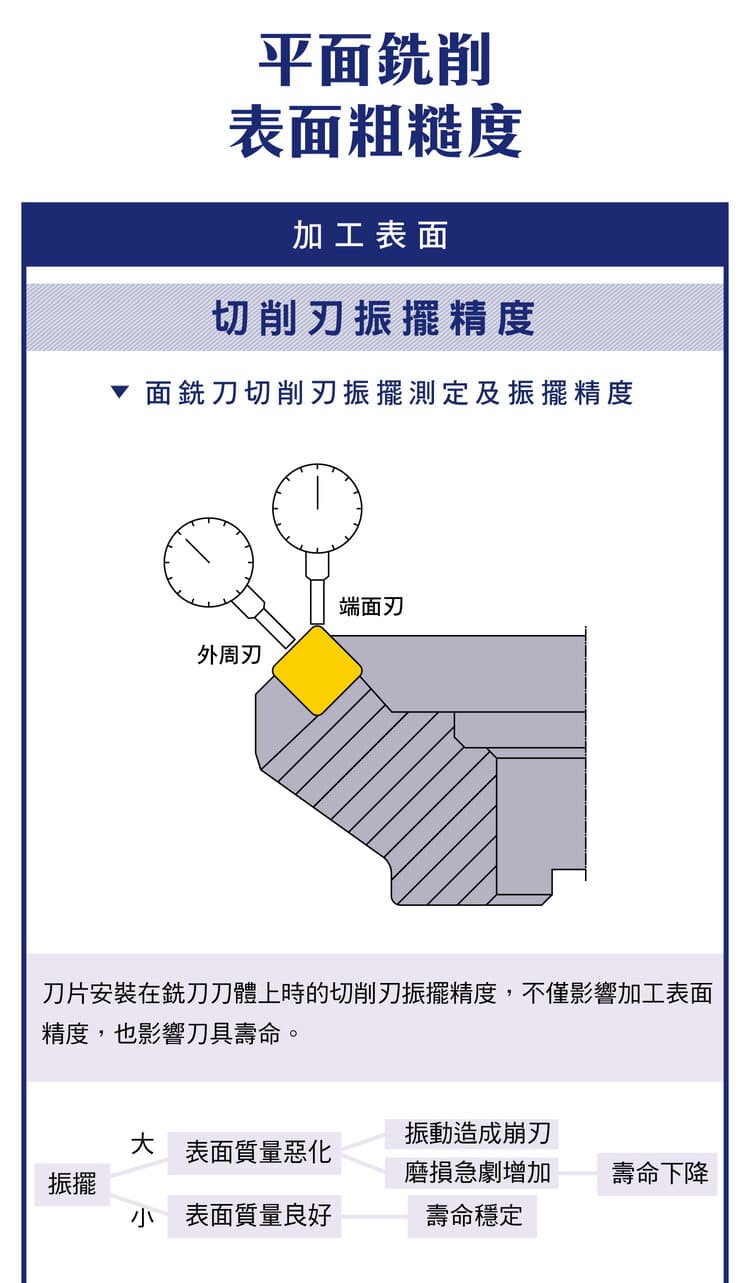
振擺(runout)是刀片旋轉時的偏擺量。振擺大→各刃切削不均、表面品質差、刀具壽命下降;振擺小→表面品質佳、壽命穩定。控制方式:提升刀具/刀把精度、確保安裝正確、清潔錐孔。
五、換完刀片先量跳動
換刀片後出現刀紋,多半是某一片高低不對。裝完先量,再切。
| 步驟 | 做法 |
|---|---|
| ① 清潔 | 刀片座與刀片底面擦乾淨;有髒屑或毛邊就會偏心 |
| ② 鎖緊 | 每一片都確認鎖緊,再開始量 |
| ③ 量跳動 | 量錶磁性座吸在工作台,測頭碰刃口,慢慢轉刀看指針;外徑與端面都要量 |
| ④ 判斷 | 一般加工約 0.05~0.08 mm 以內;精銑的端面跳動要求約 0.01~0.02 mm |
| ⑤ 修光刀片 | 確認它是軸向最突出的那一片;位置不對就修不平 |
換了新刀片還是有刀紋,先懷疑刀片座而不是刀片:刀片座本身有公差,換再好的刀片,突出量照樣有差。偏擺的量法與其他成因見〈刀具偏擺(跳動/TIR):影響、量測與降低方法〉。
六、震動與表面品質
震動大會造成崩刃、磨耗增加、粗糙度上升;震動小則表面光滑、刀具壽命延長。降低震動可從提升機台剛性、減少刀具懸伸、正確夾持著手。
七、進給量與表面粗糙度
| 參數 | 意義 | 影響 |
|---|---|---|
| fz | 每刃進給量 | 越大殘留高度越大、越粗 |
| f | 每轉進給量 | 同上,直接影響刀痕間距 |
控制策略:精加工降低進給、搭配修光刀,即可在不犧牲太多效率下取得光滑表面。切削參數計算見〈平面銑削計算公式大全〉。
八、副切削刃的影響
副切削刃(修光邊)的寬度影響表面品質,標準約 1.4 mm。副切削刃與加工面保持平行,可壓平刀痕、降低表面粗糙度;這也是修光刀能改善表面的原理。粗糙度公式與參數見〈銑削表面粗糙度計算公式〉。
九、最佳化策略
刀具配置:使用修光刀;加工條件:控制進給量;機台條件:提升剛性、減少震動。掌握振擺精度、修光刀設計與進給控制三者,即可提升表面品質、延長刀具壽命、降低加工不良。
常見問題 FAQ
Q:修光刀(Wiper)為什麼能改善表面?
修光刀有一段較長、與加工面平行的修光邊,會把前面刀刃留下的刀痕再壓平一次,只要修光長度大於進給量就能覆蓋刀痕,達到光整效果。可在較高進給下仍維持好表面。
Q:刀具振擺為什麼影響表面粗糙度?
振擺代表各刀刃旋轉半徑不一致,實際只有最凸出的刃在切削,造成受力不均、殘留高度變大、表面變粗,也加速磨耗。提升刀把/主軸精度、正確安裝可降低振擺。
Q:降進給和用修光刀哪個好?
兩者可並用。單純降進給會犧牲效率;搭配修光刀則能在較高進給下維持光滑表面,兼顧效率與品質。精加工時常見「適度進給+修光刀」的組合。
Q:大直徑面銑刀要配幾片修光刀?
大直徑刀盤可配置 2~3 片修光刀,分散修整、維持穩定。但修光刀過多或過長容易引起震動,需與轉速、進給一併調整,並確保各片高度一致。
本主題的完整導讀見〈表面粗糙度完整導讀〉、〈刀片選用完整導讀〉與〈震動與顫振完整導讀〉。
發布日期:2026-03-25|最後更新:2026-10-19