
Outside Micrometer Guide: Reading, Zeroing and Calibration
The outside micrometer is one of the shop's most-used precision instruments, reading to 0.01mm. Whether it reads true comes down to three things: knowing how to read it, zeroing before every measurement, and calibrating on a schedule. This guide covers those three steps and the common error sources behind them.
1. How a Micrometer Reading Works
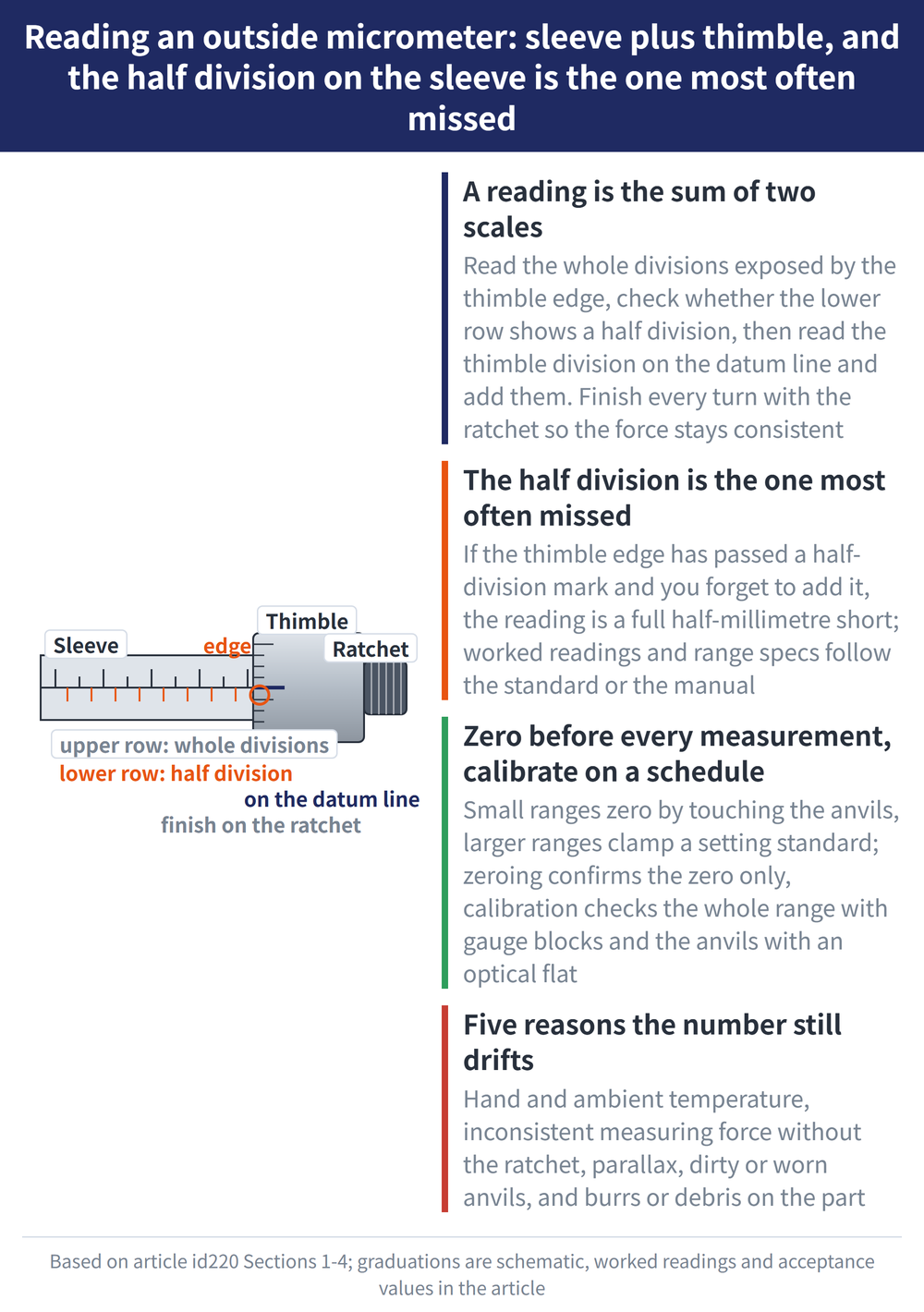
A reading is the sum of two scales: the main scale (the sleeve, 0.5mm per division) plus the vernier scale (the thimble, 50 divisions per turn at 0.01mm each). Always finish the turn with the ratchet stop at the end so the measuring force stays consistent.
| Step | Action | Worked reading |
|---|---|---|
| 1. Read the sleeve | Read the whole divisions exposed by the thimble edge, then check whether the lower row shows a half division (0.5mm) | 7mm + half division 0.5mm = 7.5mm |
| 2. Read the thimble | Read the thimble division aligned with the sleeve datum line, at 0.01mm each | 23 divisions x 0.01mm = 0.23mm |
| 3. Add them | Sleeve reading + thimble reading | 7.5 + 0.23 = 7.73mm |
Key point: the half division on the sleeve's lower row is the one most often missed. If the thimble edge has passed a half-division mark and you forget to add 0.5mm, the reading is a full half-millimetre short.
The above is a demonstration of the reading method, not measured data. Resolution, measuring range and per-range specifications follow JIS B7502 or the manufacturer's manual.
2. Zero Before Every Measurement
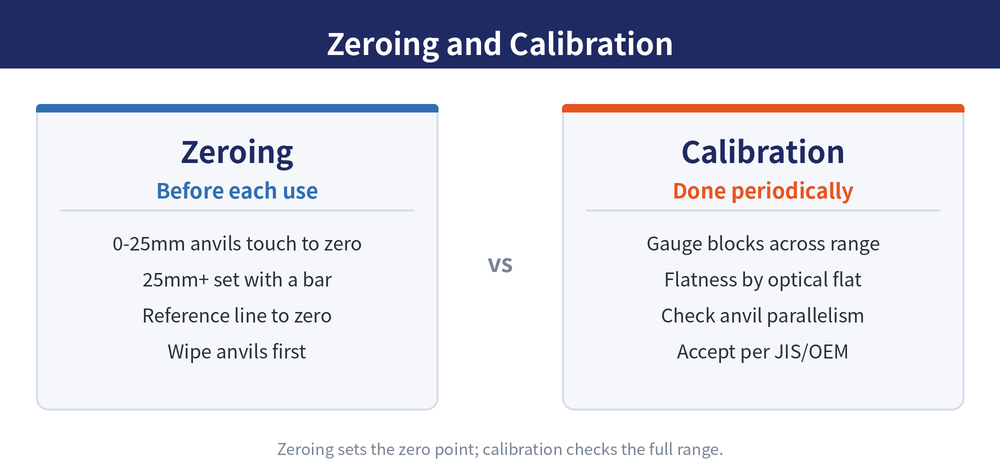
Zeroing is the precondition for an accurate reading: once the two anvils touch, the datum line should sit at zero. The method differs by range — the 0–25mm range zeroes directly, while ranges above 25mm require a setting standard (standard bar).
| Measuring range | Zeroing method | Check |
|---|---|---|
| 0–25mm | Bring the two anvils gently into contact (finish with the ratchet) and confirm zero | Whether the thimble zero line aligns with the sleeve datum line |
| Above 25mm | Clamp the setting standard (standard bar) of the matching length and set to that range's starting value | Whether the starting graduation matches the standard bar's nominal value |
If zero is offset, use the supplied wrench (adjusting hook) to turn the sleeve slightly until the datum line aligns, then confirm again. Wipe the anvils and standard bar first, so oil film or debris does not inflate the reading.
3. Calibrate on a Schedule
Zeroing only confirms the zero point; calibration confirms whether the whole range reads true. In practice, use gauge blocks (gage blocks) to verify at several points across the full range, and check the two anvils for parallelism and flatness.
| Calibration item | What to use | Reference |
|---|---|---|
| Indication error over full range | Several gauge blocks of different sizes, spread across the whole range | Acceptance per JIS B7502 or the manufacturer's manual |
| Anvil flatness | Optical flat | Acceptance per JIS B7502 or the manufacturer's manual |
| Anvil parallelism | Optical flat or parallelism checker | Acceptance per JIS B7502 or the manufacturer's manual |
Calibration interval, per-item acceptance tolerances and environmental conditions all follow JIS B7502 or the manufacturer's manual, not any figure in this article.
4. Common Error Sources
Even with reading, zeroing and calibration all correct, the number can still drift. The table below sets out the error sources seen most often on the floor, with their fixes.
| Symptom | Cause | Fix |
|---|---|---|
| Reading drifts over time | Temperature: heat from the hand, ambient not at standard temperature | Hold the heat-insulating plate and minimise time gripping the frame; standard temperature and allowance per JIS B7502 or the manufacturer's manual |
| Same part reads differently | Inconsistent measuring force (ratchet not used, grip too tight or too loose) | Always finish with the ratchet stop for uniform force |
| Reading varies up and down | Parallax: line of sight not square to the graduation | Read with the line of sight perpendicular to the datum line |
| Will not zero | Dirty or worn anvils | Wipe the anvils before measuring; send visibly worn units for calibration or repair |
| Reading is too large | Workpiece burr or trapped chips propping it open | Deburr and clean the measuring faces before measuring |
Confirming the instrument's condition before measuring matters just as much. Further reading: Vernier Caliper Complete Guide, Gauge Block Use and Calibration Guide and Dial and Lever Indicator Guide.
Last updated: 2026-07-27
5. Frequently Asked Questions (FAQ)
Q: How often should a micrometer be calibrated?
The interval depends on usage frequency, environment and your quality system; the actual interval and acceptance values follow JIS B7502 or the manufacturer's manual. Zeroing before each measurement, by contrast, is done every time.
Q: Can I zero without a setting standard?
On the 0–25mm range the two anvils can touch and zero directly, no standard needed. Above 25mm, without a standard bar of the matching length the starting value cannot be set correctly, so it must not be skipped.
Q: Why does the same part read differently?
Usually inconsistent measuring force or parallax. Always finish with the ratchet for uniform force, read square-on to the graduation, and check that both the anvils and the workpiece are clean and burr-free.
Q: What is the difference between a micrometer and a vernier caliper?
A micrometer reads to 0.01mm with higher resolution but only 25mm per range; a vernier caliper has a wider range and measures inside, outside and depth, but at lower resolution. Use a micrometer for fine outside-diameter work and a caliper for quick general measurement — see the Vernier Caliper Complete Guide.
This article is part of Precision Measurement Complete Guide: Ask What You Are Measuring First, Then Pick the Instrument; that guide shows how the whole topic fits together.