Drilling Troubleshooting Guide: Breakage, Diameter & Burrs
A drill snapped, the hole is out of size, the burrs will not go away — this guide works backwards from what you can see to the cause, then tells you which one to change: cutting conditions, tool rigidity, coolant supply, or point geometry. Breakage, diameter deviation, vibration, chip clogging, rough walls, burrs and abnormal wear each get their own order of checks, so you know what to adjust next.
1. Common Fault Types
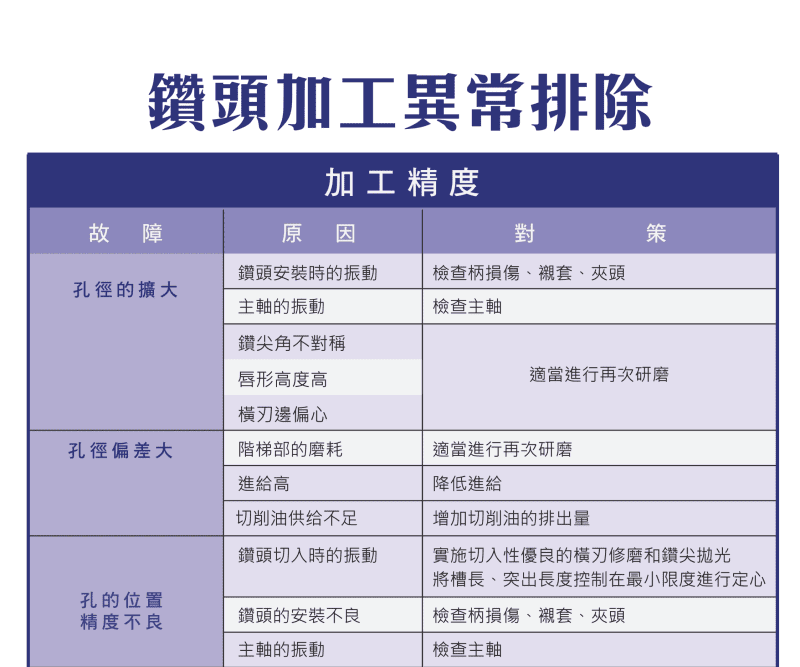
Drilling faults fall into four groups: tool damage, diameter anomalies, poor surface quality and evacuation problems — all affecting accuracy, tool life and efficiency.
2. Symptom – Cause – Countermeasure Table
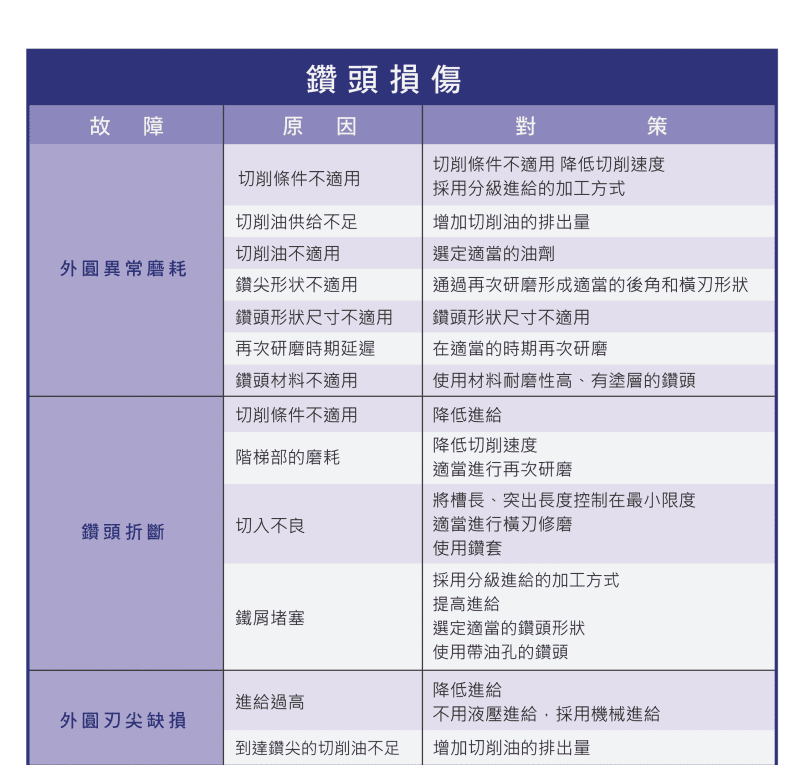
| Symptom | Main cause | Countermeasure |
|---|---|---|
| Drill breakage | Feed too high, low rigidity, over-aggressive conditions | Lower feed/speed, raise rigidity, use a drill bushing |
| Outer-edge / land wear | High temperature, poor cooling, excess friction | Add coolant, improve cooling, use wear-resistant tools |
| Chisel / point chipping | Excess cutting resistance, unstable entry | Adjust feed, improve geometry |
| Diameter oversize | Tool runout, vibration, wear, low rigidity | Regrind, raise holding rigidity, reduce vibration |
| Diameter undersize | Tool wear, thermal expansion | Replace tool on schedule, improve cooling |
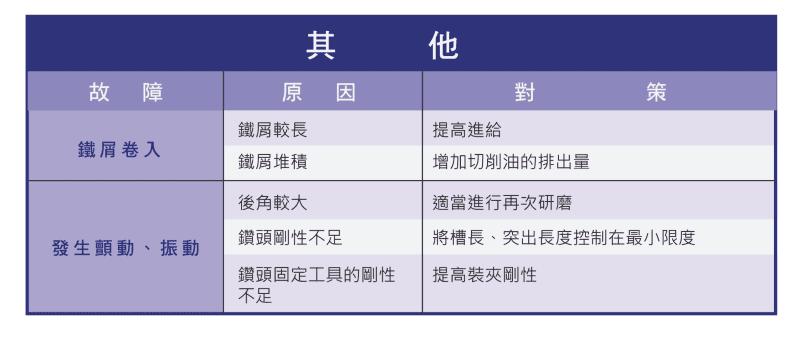
| Chip clogging / long chips | Poor evacuation, insufficient coolant | Peck feeding, more coolant flow, through-coolant drill |
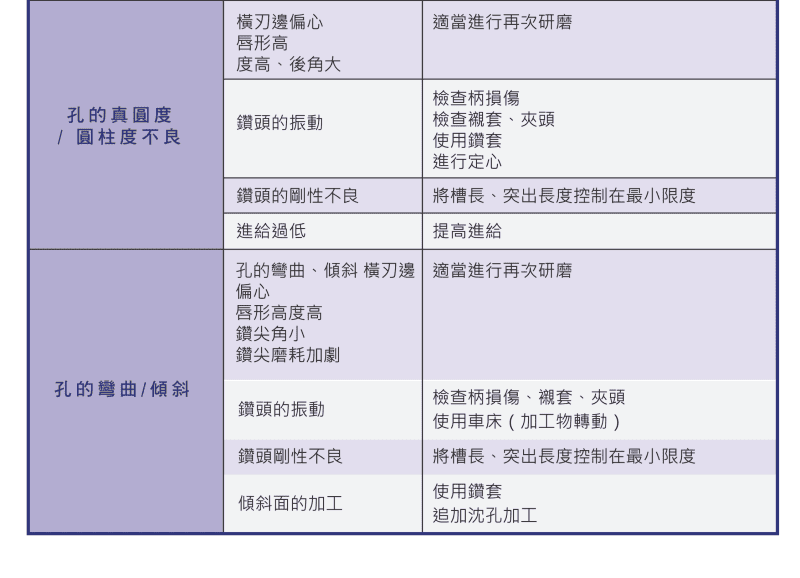
| Hole bow / poor straightness | Low machine accuracy, unstable guidance, asymmetric point | Improve machine accuracy and holding, grind symmetric edges |
| Rough wall / chatter marks | Tool wear, vibration | Lower cutting speed, use precision tools |
| Burrs | Wrong conditions, dull tool | Adjust conditions, use a sharp tool |
3. Common Root Causes
| Category | Condition | Effect |
|---|---|---|
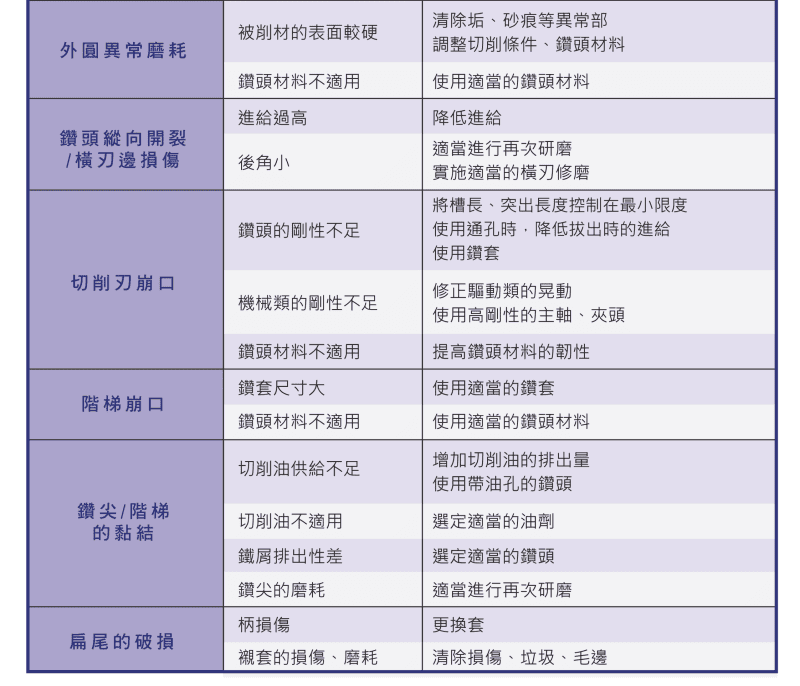
| Low tool rigidity | Flute too long, excessive overhang | More vibration, lower accuracy |
| Poor geometry | Asymmetric point, off-center chisel, wrong clearance | Hole drift, poor entry |
| Machine & holding | Spindle vibration, worn chuck or sleeve | Lower accuracy, more vibration |
4. Key Countermeasures
Breakage is usually tied to high feed and low rigidity — lower feed, raise rigidity and use bushing guidance. Chip clogging responds to peck feeding, more coolant flow and through-coolant drills; for coolant choice, see Cutting Fluid Comparison for Drilling. Diameter and accuracy problems come from vibration and wear — regrind and improve holding. For abnormal wear, adjust conditions and use wear-resistant tools; see Drill Wear Analysis.
5. Systematic Troubleshooting Flow
| Step | Action |
|---|---|
| 1 | Identify the symptom (diameter, surface, tool, chips) |
| 2 | Map to likely causes |
| 3 | Adjust cutting conditions (feed, speed, cooling) |
| 4 | Check tool and machine (geometry, rigidity, holding) |
| 5 | Apply improvements and re-verify |
6. Optimization Tips
Control flute length and overhang, regrind tools regularly, keep coolant supply stable and use suitable tool material and coatings to reduce faults at the source. For setting conditions, see the Drilling Parameters Guide.
FAQ
Q: My drill keeps breaking — what do I do?
Breakage is usually from high feed or low rigidity. Lower feed and speed, shorten overhang to raise rigidity and use bushing guidance; for deep holes, switch to peck feeding with through-coolant evacuation.
Q: Why does hole diameter vary?
Oversize usually means vibration, runout or wear; undersize usually means wear or thermal expansion. Regrind, raise holding rigidity, reduce vibration and improve cooling with scheduled tool changes.
Q: The hole bows / has poor straightness?
It's usually machine accuracy, unstable guidance or an asymmetric point. Improve machine accuracy and holding, grind the point symmetrically, and use a center point to guide entry if needed.
Q: How do I reduce exit burrs?
Burrs come from wrong conditions or a dull tool. Adjust conditions, fit a sharp tool, chamfer the hole or use a flat insert, and keep evacuation smooth.
For the full reading guides on this topic, see Tool Life and Wear: A Complete Reading Guide and Hole Accuracy: A Complete Reading Guide.
This article is part of Drill Bits: The Complete Guide - Start From Depth-to-Diameter, Then Pick the Drill and Set the Conditions; that guide shows how the whole topic fits together.
Published: 2026-03-19 | Last updated: 2026-10-31