
Face Milling Surface Finish: Wiper Inserts, Runout & Feed
Face-milling surface finish is driven mainly by wiper inserts, cutter runout accuracy and feed. A wiper insert re-cuts the machined face to improve finish; controlling runout and feed lowers roughness and extends tool life. The three keys — vibration control, tool setup and feed setting — are core to face-milling surface accuracy.
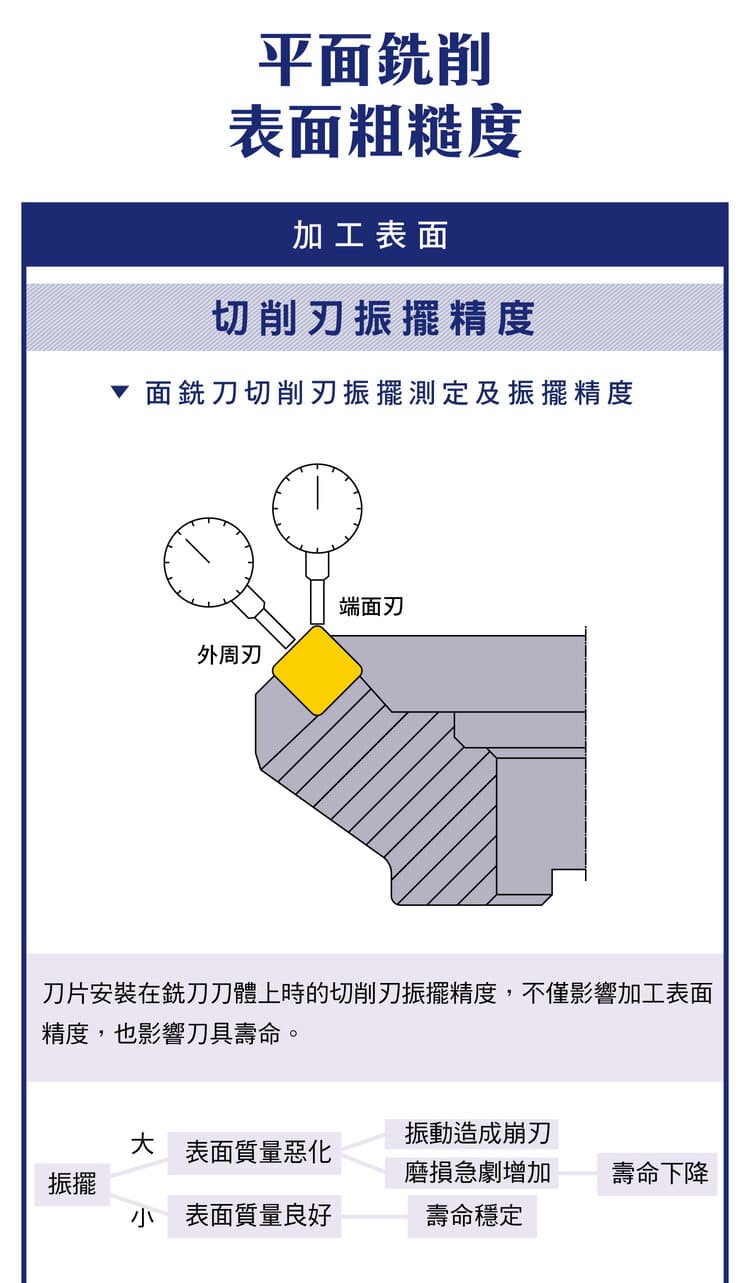
1. Factors Affecting Surface Finish
| Factor | Note |
|---|---|
| Tool geometry | Wiper edge / insert type set residual height |
| Vibration | More vibration → rougher, chipping |
| Feed | Larger feed → higher roughness |
| Tool setup | Wiper, flute count, mounting stability |
Core goals: lower roughness, higher finish, stable quality.
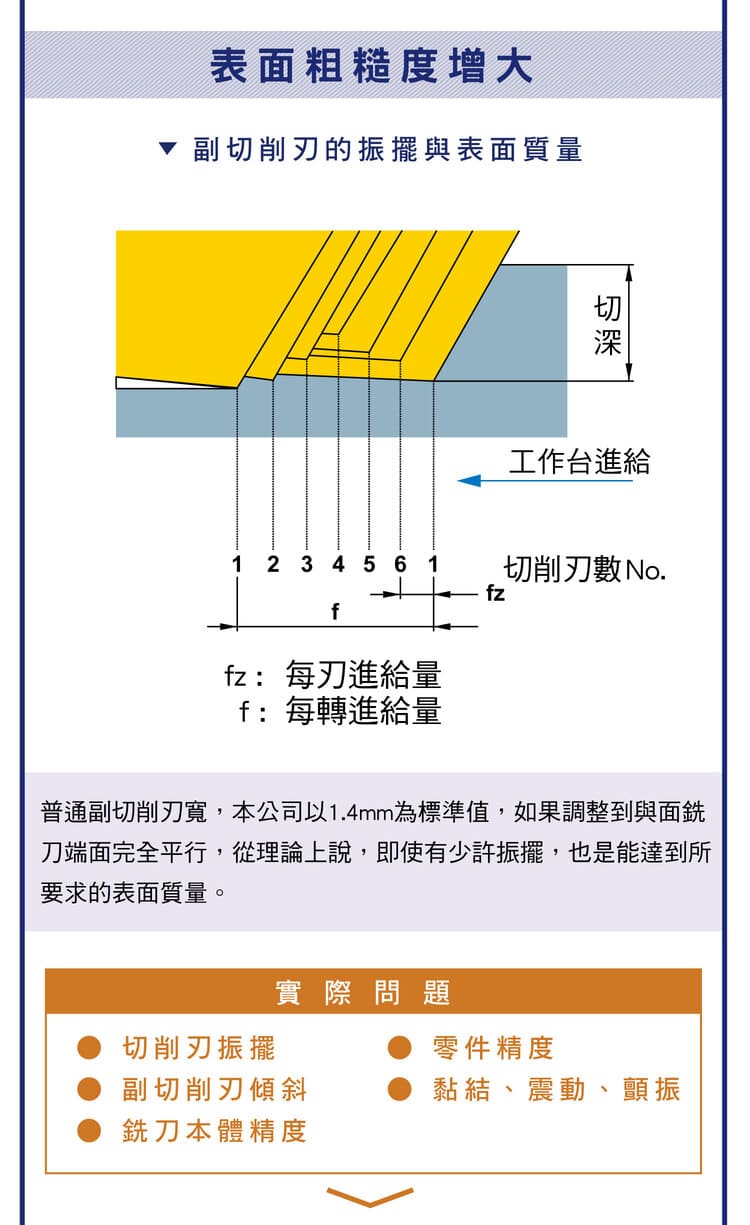
2. Wiper Inserts
A wiper insert re-finishes the machined surface for a smoother result. Wiper length is about 0.03–0.1 mm. Keys:
The wiper length must be greater than the feed to cover the tool marks.;Too long invites vibration — balance it.;A large cutter can carry 2–3 wiper inserts.。
Mainly for finishing and high surface-quality needs.
3. Wiper Mounting
Two ways: replace one standard insert, or fit a dedicated seat. The key is a stable tool and avoiding interference/vibration between multiple inserts.
When you are chasing surface finish, the problem is often the height difference between teeth: even with precise inserts, the insert pockets on the cutter body have tolerances, so teeth protrude by different amounts and the feed per tooth becomes uneven. The four set-ups below all deal with that difference (per the ISCAR milling applications guide):
| Set-up | How it works | Trade-off |
|---|---|---|
| Fly cutter | Only one insert, so there is no tooth-to-tooth difference | Far lower productivity than a multi-tooth face mill |
| Integrated wiper flat | Wiper flat wider than the feed per revolution; the most protruding insert finishes the surface; Ra down to 0.4 µm on steel and cast iron | Large or close-pitch cutters are limited by wiper width |
| Dedicated wiper insert | Fits the same pocket and protrudes 0.05–0.07 mm axially beyond the standard inserts | Useless if mounted in the wrong position |
| Step milling cutter | Inserts stepped radially and axially so each cuts only a small portion; Ra down to 0.1 µm | A special-design tool |
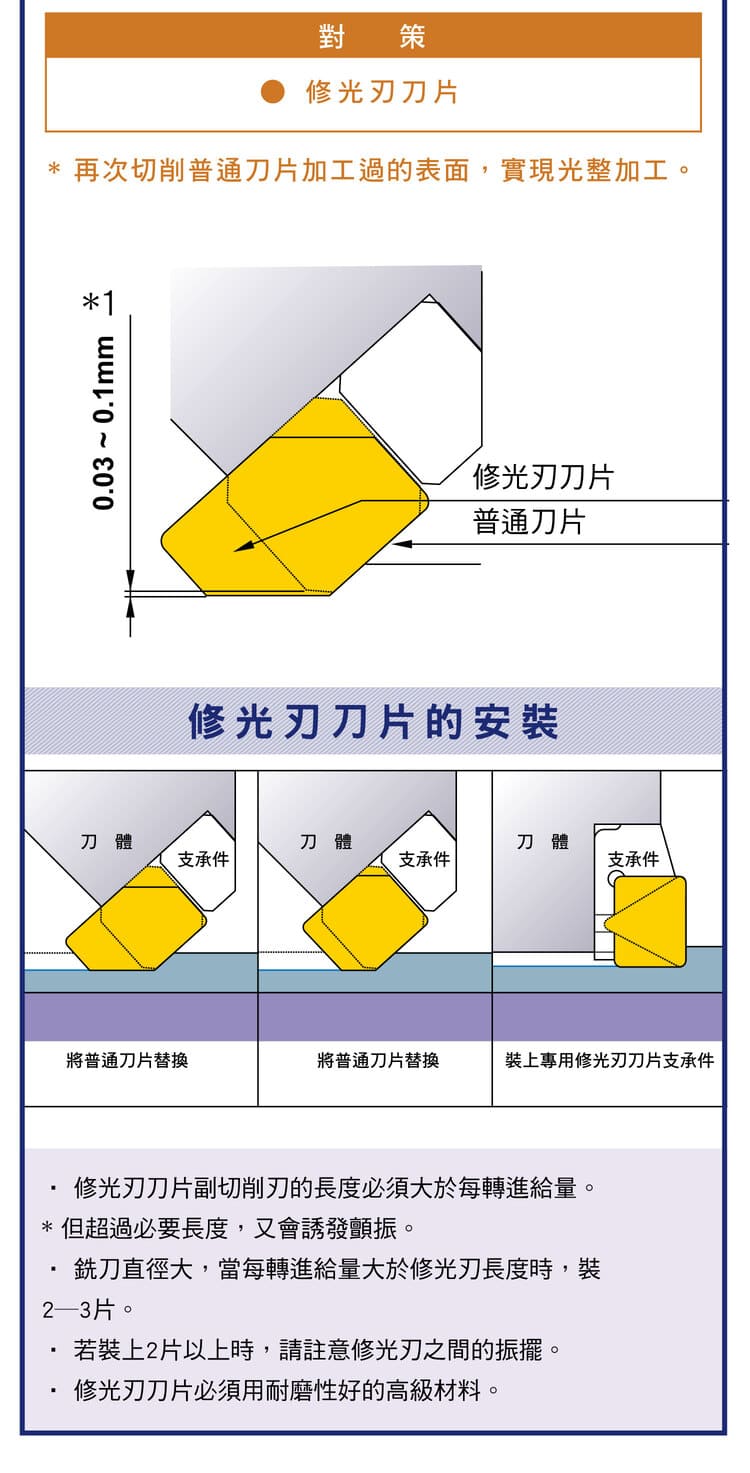
4. Cutter Runout Accuracy
Runout is the wobble of the inserts as they rotate. High runout → uneven cutting, poor finish, shorter life; low runout → good finish, stable life. Control by improving tool/holder accuracy, correct mounting and a clean taper.
5. Measure Runout After Changing Inserts
Feed marks after an insert change usually mean one insert sits at the wrong height. Measure after mounting, then cut.
| Step | What to do |
|---|---|
| ① Clean | Wipe the pocket and the insert seat; chips or burrs throw the insert off-center |
| ② Tighten | Confirm every insert is tight before measuring |
| ③ Measure runout | Set the dial indicator’s magnetic base on the table, touch the probe to the edge and turn the cutter slowly; check both diameter and face |
| ④ Judge | General work: within about 0.05–0.08 mm; for finishing, face runout of about 0.01–0.02 mm |
| ⑤ Wiper insert | Confirm it is the most protruding insert axially; in the wrong position it will not finish the surface |
If new inserts still leave feed marks, suspect the pockets rather than the inserts: the pockets have their own tolerances, so protrusion still varies however good the insert is. For how to measure runout and its other causes, see Tool Runout (TIR): Effects, Measurement and How to Reduce It.
6. Vibration vs Surface Quality
Heavy vibration causes chipping, more wear and higher roughness; low vibration gives a smooth surface and longer life. Reduce vibration with more machine rigidity, less tool overhang and correct clamping.
7. Feed vs Roughness
| Parameter | Meaning | Effect |
|---|---|---|
| fz | Feed per tooth | Larger → higher residual height, rougher |
| f | Feed per rev | Sets tool-mark spacing |
Strategy: lower feed on finishing and pair with a wiper for a smooth surface without losing much efficiency. For cutting-parameter formulas see the Face Milling Formula Guide.
8. Effect of the Wiper (Secondary) Edge
The wiper (secondary) edge width affects finish — standard is about 1.4 mm. Kept parallel to the machined face, it flattens tool marks and raises finish; this is how wiper inserts improve the surface. For roughness formulas see the Milling Surface Roughness Formula.
9. Optimisation Strategy
Tool setup: use a wiper; conditions: control feed; machine: raise rigidity and cut vibration. Master runout accuracy, wiper design and feed control to improve finish, extend tool life and reduce defects.
FAQ
Q: Why does a wiper insert improve the surface?
A wiper has a longer edge parallel to the surface that re-flattens the marks left by the main edges. As long as the wiper length exceeds the feed, it covers the marks for a smooth finish — even at higher feed.
Q: Why does runout affect roughness?
Runout means the insert cutting radii differ, so only the most proud edge actually cuts — giving uneven load, larger residual height, a rougher surface and faster wear. Better holder/spindle accuracy and correct mounting reduce it.
Q: Lower the feed or use a wiper?
Use both. Lowering feed alone costs efficiency; pairing a wiper keeps a smooth surface at higher feed, balancing efficiency and quality. Finishing often uses "moderate feed + wiper".
Q: How many wipers on a large face mill?
A large cutter body can take 2–3 wipers to spread the finishing and stay stable. But too many or too long invites vibration, so tune with speed and feed and keep all inserts at equal height.
For the full reading guides on this topic, see Surface Finish: A Complete Reading Guide, Insert Selection: A Complete Reading Guide and Vibration and Chatter: A Complete Reading Guide.
Published: 2026-03-25 | Last updated: 2026-10-19