Tool Nose Radius Compensation on CNC Lathes: Why Tapers and Arcs Come Out Off, and How to Set G41/G42 and Tool Offsets
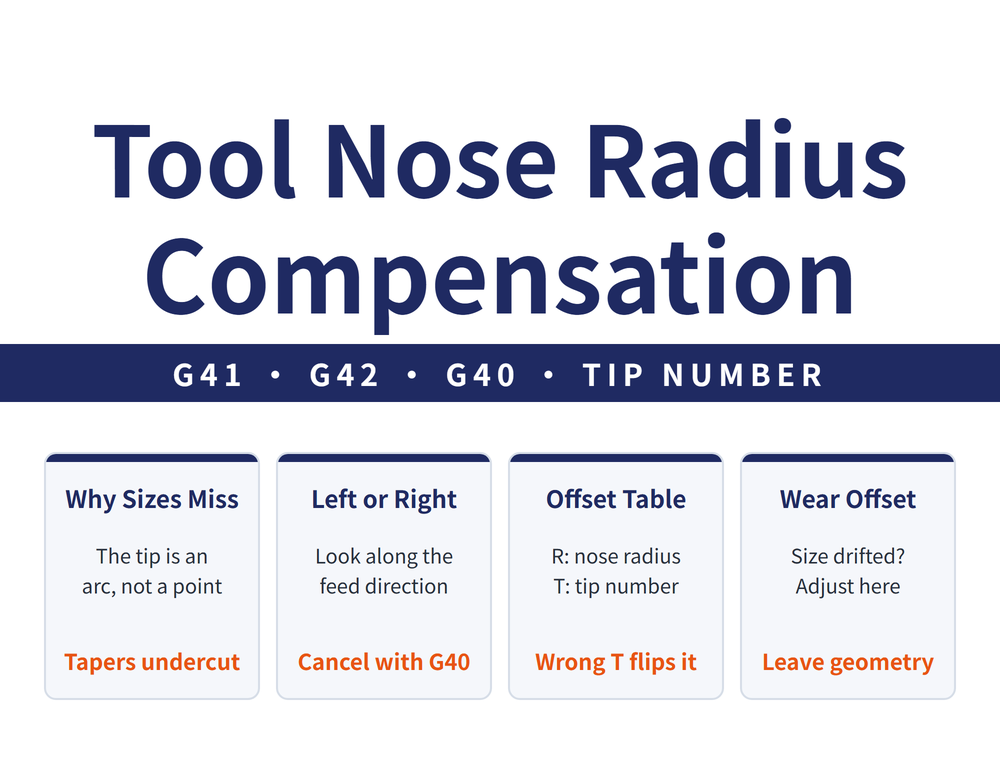
A CNC lathe program follows an imaginary tool tip, but the real tip is an arc. On OD and face cuts that does not matter; on tapers and arcs the actual depth of cut falls short and the size comes out off. The fix is tool nose radius compensation: enter the nose radius R and the tool tip direction number in the offset table, and use G41/G42 so the control follows the path of the arc center, then cancel with G40. When a measured size drifts, change the wear offset, not the geometry offset.
1. Why tapers and arcs come out off: the real tool tip is not a point
When you set the tool you touch off an imaginary tool tip that does not physically exist, and the program path is the path of that point. The real tip is an arc of radius r.
| Cut | Off size? | Why |
|---|---|---|
| OD and face | No | The arc touches the part on the line the imaginary tip follows |
| Taper and arc | Yes, undercut | The contact point moves away from the imaginary tip, so the real profile departs from the programmed one |
The larger the nose radius, the larger the error. For choosing the nose radius see Turning Tool Nose Radius Guide: Surface Finish & Tool Life.
2. What G41, G42 and G40 do
Compensation makes the control follow the path of the nose-radius center instead, which takes the error back out. It is also called tool radius compensation.
| Code | Meaning |
|---|---|
| G41 | Left compensation: looking along the direction of tool travel, the nose-radius center is offset to the left |
| G42 | Right compensation: looking along the direction of tool travel, the nose-radius center is offset to the right |
| G40 | Cancel tool nose radius compensation |
Left and right are judged along the direction of tool travel, not from where the operator stands.
3. Filling in the offset table: X, Z, R and T
Each offset number points to one row of the offset table, and the four fields mean:
| Field | What goes in |
|---|---|
| X, Z | Tool position offset values |
| R | Tool nose radius, from the insert specification |
| T | Tool tip direction number (0-9) |
The tip number tells the control on which side of the arc center the imaginary tip lies: 1-8 cover the directions in the X-Z plane, and the use of 0 and 9 depends on the control. The numbers follow the machine axes, so front and rear turrets look like mirror images on paper; enter the wrong number and the compensation goes the wrong way. Take the direction for each number from the control manufacturer's manual. To read the nose radius from the insert code see ISO Turning Insert Guide: CNMG Designation & Selection.
4. Tool position offsets: geometry and wear are set separately
The tool position offset corrects the X and Z difference between the real tool and the reference tool used for programming. A common form is T0202: the first two digits are the tool number and the last two the offset number (FANUC shown as an example; other controls may differ).
| Type | What it corrects | When to change it |
|---|---|---|
| Geometry offset | The fixed difference between where the tool is mounted and the reference tool | When mounting and touching off the tool |
| Wear offset | Wear at the tool tip | When a measured size drifts during production |
Keeping the two apart means that when a size drifts you change only the wear offset, and the touch-off reference stays intact.
5. Three rules for using it
These three rules are the same for radius compensation on lathes and on mills (for the full milling setup, see Tool Length Offset and Cutter Radius Compensation on CNC Mills: Sizes Off After a Tool Change or Regrind? How to Set G43 and G41/G42):
| Rule | How |
|---|---|
| Start compensation only on a straight move | Write G41 or G42 only together with G00 or G01 |
| Never start it on an arc | Do not give G41 or G42 in a circular block |
| Always cancel it | After using G41 or G42 in a program, cancel with G40 |
Plan where compensation starts and ends together with the approach and retract moves; see How to Plan a Turning Toolpath: Definition, Four Principles and Three Retract Methods.
FAQ
Q: Why do tapers and arcs always come out slightly off?
The program follows an imaginary tip, but the real tip is an arc, so on tapers and arcs the depth of cut falls short. Turn on tool nose radius compensation (G41/G42) and enter R and the tip direction number in the offset table.
Q: How do I tell G41 from G42?
Looking along the direction of tool travel, use G41 when the nose-radius center is offset to the left and G42 when it is to the right; cancel with G40.
Q: What happens if the tip direction number is wrong?
The control assumes the imaginary tip lies in another direction, so the compensation goes the wrong way. Take the direction for each number from the control manufacturer's manual.
Q: A size has drifted. Which field do I change?
The wear offset. The geometry offset records the fixed difference between the tool mounting and the reference tool; do not use it to correct sizes during production.
Last updated: 2026-10-28
For the full reading guide on this topic, see Turning: The Complete Guide.