Logo

Anti-Vibration Tool Holders: Chatter, Dynamic Vibration Absorbers & Setup

Anti-Vibration Tool Holders: Chatter, Dynamic Vibration Absorbers & Setup | CNC57anti-vibration tool holder, damped tool holder, chatter, dynamic vibration absorber, DVA, stability limit diagram, long overhang, boring bar chatter, CNC machininghttps://cnc57.com/en/technical_information/Anti-Vibration-Tool-Holder-Guidehttps://cnc57.com/api/cnc57/image/20260812214441066.pngen2026-08-08
CNC57 Industrial Procurement Platform
Chatter is the biggest fear in long-overhang milling and boring - once it starts, it tends to self-amplify, leaving surface waviness, chipped edges, and shorter tool life. This guide explains what causes chatter (self-excited vibration), how the dynamic vibration absorber (DVA) inside anti-vibration holders is tuned, key setup practices, and how insert geometry helps reduce vibration at the source.

Chatter is the biggest fear in long-overhang milling and boring - once it starts, it tends to self-amplify, leaving surface waviness, chipped edges, and shorter tool life. This guide explains what causes chatter (self-excited vibration), how the dynamic vibration absorber (DVA) inside anti-vibration holders is tuned, key setup practices, and how insert geometry helps reduce vibration at the source.

1. What Chatter Is - A Self-Reinforcing Loop

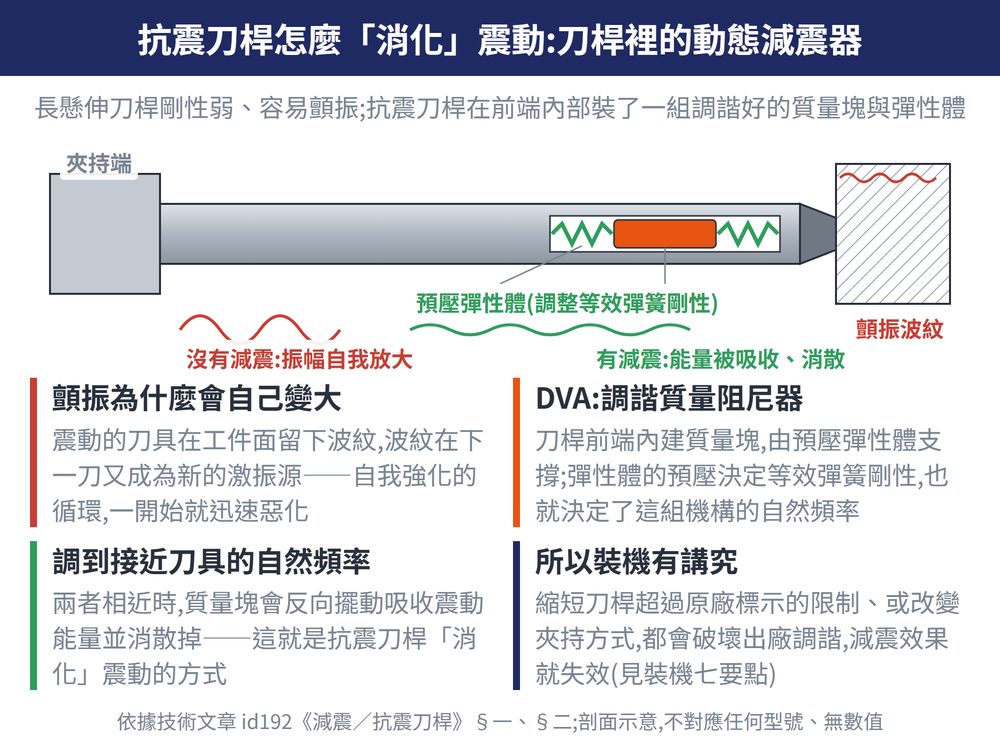
The most familiar form of tool vibration is self-excited vibration, commonly called chatter. A vibrating tool leaves waviness on the workpiece surface, and that waviness becomes a new excitation source on the next pass, creating a self-reinforcing loop - which is why chatter escalates quickly once it starts rather than fading away. In long-overhang milling and boring the holder extends further and is inherently less rigid, making them high-risk conditions for chatter.

Boring bars and chatter: see Boring Bar Guide.

2. How Anti-Vibration Holders Absorb Vibration - the DVA Principle

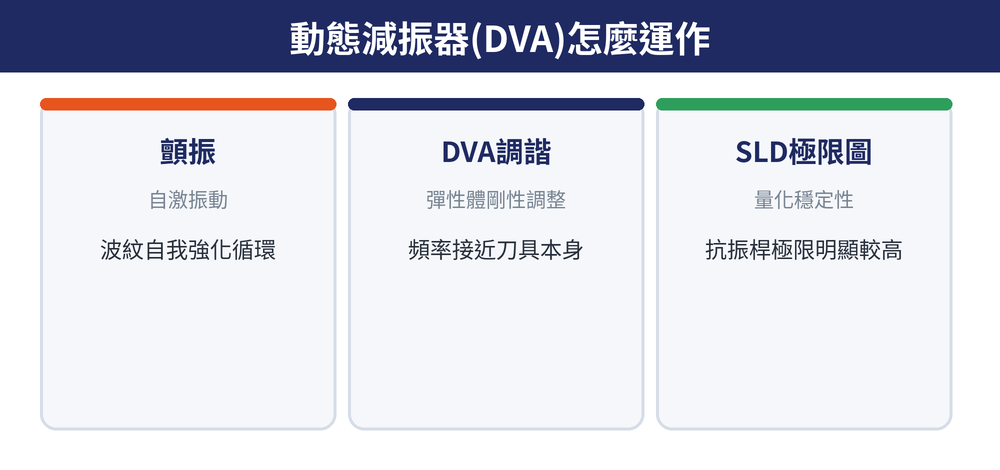
Anti-vibration holders contain a preloaded elastomer mechanism used to tune the effective spring stiffness. That stiffness shifts the DVA system's natural frequency, and the system is tuned so the DVA's natural frequency is close to the tool's own natural frequency - when the two are matched, the DVA absorbs and dissipates vibration energy, a classic tuned mass damper application.

The industry uses a Stability Limit Diagram (SLD) to turn the qualitative sense that "this holder chatters less" into a comparable quantitative metric: by increasing tool damping and lowering the peak amplitude of the frequency response function (FRF), an anti-vibration holder's stability limit is typically noticeably higher than a comparable conventional holder.

Dynamic vibration absorber (DVA) tuning principle: elastomer stiffness adjustment, natural frequency matching, vibration energy absorption

Balance at high rpm: see Tool Holder Balance Grade (G Value).

How an anti-vibration holder absorbs chatter: the damper inside the bar - diagram: Why chatter grows on its own:A vibrating tool leaves waves on the surface; on the next pass those waves excite the tool again - a self-reinforcing loop that worsens fast; DVA: a tuned mass damper:A mass sits inside the front of the bar, supported by preloaded elastomer; the preload sets the effective spring stiffness and so the natural frequency of the damper; Tuned close to the tool frequency:When the two frequencies are close, the mass swings against the vibration and dissipates its energy - that is how the bar 'digests' chatter; Which is why setup matters:Shortening the bar beyond the maker's limit or changing the clamping upsets the factory tuning and the damping stops working (see the seven setup points)

3. Seven Setup Points (Part 1) - Sizing, Clamping and Inverted Mounting

Buying an anti-vibration holder doesn't guarantee it works; performance depends heavily on setup. The first four points cover sizing and clamping:

PointNotes
Holder sizingThe holder's minimum diameter parameter should generally be 10%-20% smaller than the bore being machined, to leave room for chip clearance and deflection
Clamping rigidityA flat-bed tool post typically offers more rigidity than turret clamping; with large-diameter holders the self-weight moment increases significantly, so the impact of clamping rigidity is amplified
Mounting upside downIn some setups, mounting the holder upside down lets its self-weight moment oppose the clamping system's load direction, reducing the moment load on the turret
Clamping methodChoose a clamping method that applies force evenly around the holder's circumference (e.g. a split sleeve) rather than a single-point screw

4. Seven Setup Points (Part 2) - Zero Setting, Shortening Limit and Overhang Baseline

The remaining three points decide whether the damping mechanism keeps its factory tuning:

PointNotes
Zero settingFollow the manufacturer's procedure for tool zero-setting during installation - a standard step for anti-vibration holders
Shortening limitIf the holder needs shortening, always check the marked minimum length limit - shortening past it can disrupt the tuning of the internal damping mechanism
Overhang baselineAnti-vibration performance is typically pre-calibrated at a specific overhang (a common industry baseline is around 100mm); the further you deviate, the less reliable the pre-calibration becomes

The shortening limit is the biggest operational difference between an anti-vibration holder and a solid one: shortening a solid holder only affects rigidity, while shortening an anti-vibration holder past its limit can disrupt the internal tuned frequency and disable the damping effect - easy to overlook when cutting a holder down to length on the shop floor.

Runout, measured and reduced: see Tool Runout: Effects and Control.

5. Insert Geometry: The First Line of Defense Against Vibration

Vibration suppression doesn't rely on the holder mechanism alone - insert geometry is equally critical to successful chatter control:

PrincipleEffect
Use an overall positive-rake geometry insertReduces cutting force - the lower the cutting force, the less vibration energy needs to be absorbed
Use a positive rake faceFurther reduces cutting resistance
Use a small edge honeUsually achieved by grinding the insert or choosing a thin-coated insert; reduces the edge's contribution to cutting force

These three principles serve the same goal: reduce cutting force by every means available. The DVA deals with vibration that has already occurred, while insert geometry addresses its root cause - the two are complementary, not interchangeable, and an expensive holder paired with the wrong insert geometry will still undercut the result. Maintaining a constant spindle speed is also a key factor for stable, controllable cutting - speed fluctuation is a major variable affecting vibration.

FAQ

Q1: Can I cut an anti-vibration holder down to any length?

Not recommended without checking first. Anti-vibration holders contain a tuned internal damping mechanism (such as a preloaded elastomer), and the holder is usually marked with a minimum length it can be shortened to. Cutting past that limit can disrupt the internal tuned frequency and disable the damping effect - you'd end up with an anti-vibration holder that no longer damps. Always check the manufacturer's marked limit before cutting.

Q2: Why does chatter still occur even with an anti-vibration holder?

Common causes include insufficient clamping rigidity (e.g. using turret clamping for a large-diameter holder without accounting for the moment load), a holder that's been shortened past its tuning limit, wrong insert geometry (insufficient positive rake or too large an edge hone, driving up cutting force), or unstable spindle speed. An anti-vibration holder is an aid, not a substitute for correct clamping and insert selection. See Before the Coating: How Edge Preparation Affects Adhesion and Tool Life for details.

Q3: Are anti-vibration holders only for boring?

Most commercially available anti-vibration tooling targets internal (boring) operations, since long overhang and inherently lower rigidity make boring a high-risk condition for chatter. Some manufacturers do offer anti-vibration blades for external turning as well, so confirm the product supports your actual operation (internal or external) before selecting.

Q4: How do I tell if I'm actually dealing with chatter?

Typical signs of chatter are regular waviness on the machined surface and a noticeably louder, sharper machining noise, with the waviness usually growing progressively along the tool path rather than staying constant. If you see this kind of waviness together with a long tool overhang, it's more likely chatter than simple tool wear or a feed rate issue.

For the full reading guides on this topic, see Insert Selection: A Complete Reading Guide and Vibration and Chatter: A Complete Reading Guide.

標籤
Boring Tool
Tool Holder
Insert
Vibration & Chatter
分享
推薦文章