Turning Tool Selection: A Six-Step Decision Path
Turning tool selection follows a fixed order: outside in, coarse to fine. The workpiece and the operating conditions are the input, and the insert grade is the last output. Get the order wrong and every later step turns into damage control. This guide breaks selection into six steps and lists the trap that is easiest to fall into at each one.
1. The Order in Thirty Seconds
The six steps fall into three blocks, and a trial cut closes the loop at the end.
| Block | What it covers | In one line |
|---|---|---|
| Input, steps 1 and 2 | Workpiece material, operation and clamping | Do not run it backwards; settle these first |
| Tool, steps 3 to 5 | Insert shape, holder, geometry and rε | From the broad direction down to the detail |
| Data, step 6 | vc, fn and ap | From the catalogue recommendation and a trial cut |
| Feedback | Chips, wear pattern, surface and size | It converges; it is not a one-shot answer |
2. Why Selection Needs an Order
The most common mistake is picking the insert first and then bending everything else around it. Once the insert is fixed, the holder, the clamping and the cutting data can only compromise.
The correct order is outside in, coarse to fine: workpiece material and operating conditions are the input, and the insert grade is the final output. Each step narrows the choices for the one after it.
Reverse that order and the result is scattered tool life, unstable size and surface finish that comes and goes, with problems that never run out. For the symptom side, see the Turning Troubleshooting Guide.
3. The Six-Step Decision Path
Each step answers a single question, and you only move on once it is answered.
| Step | What it decides | What to look at |
|---|---|---|
| 1. Read the workpiece material | The direction for tool grade and coating | Which of the six ISO material groups the part falls in, plus hardness and heat treatment condition |
| 2. Read the operation and the clamping | How much rigidity and chip control the job needs | Roughing or finishing, external, internal or facing, the length-to-diameter ratio and the clamping method |
| 3. Choose insert shape and nose angle | The trade-off between edge strength and accessibility | The profile to be cut and the lead angle required |
| 4. Choose the holder and clamping system | Rigidity on the tool side and where the tool can reach | Holder style and shank section, overhang length, and the bore size and depth limits |
| 5. Choose insert geometry and rε | How freely it cuts, plus surface finish and radial force | Positive or negative rake, chipbreaker style, edge preparation and the size of rε |
| 6. Set the cutting conditions | The three numbers actually programmed | vc, fn and ap, taken from the catalogue range and closed in by a trial cut |
A few terms: the six groups are P, M, K, N, S and H, see ISO Workpiece Material Classification; the length-to-diameter ratio is how far the workpiece sticks out relative to its diameter; rε is the nose radius, see Turning Tool Nose Radius.
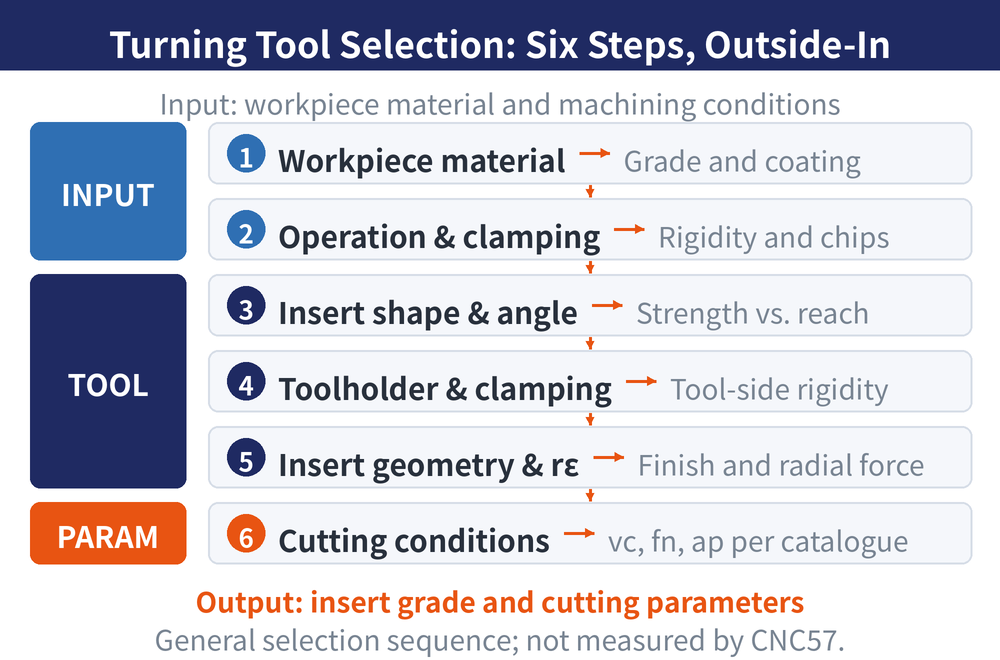
Steps 1 and 2 are the input, steps 3 to 5 are the tool, step 6 is the data. If the first two are not pinned down, the remaining four are guesswork. For insert designations see ISO Turning Insert Designation Guide, and for holders see External Turning Tool Holder Guide.
4. The Trap in Each Step
Selection usually fails not because the wrong code was ordered, but because a step was skipped.
| Step | Common mistake | Consequence |
|---|---|---|
| 1. Material | Going by the material name alone without checking the heat treatment condition | Wrong grade and coating, abnormal wear and tool life far below expectation |
| 2. Operation and clamping | Ignoring the length-to-diameter ratio and treating a slender part like an ordinary one | Radial force pushes the part away, producing taper and size drift |
| 3. Insert shape | Defaulting to a large nose angle for the sake of strength | The profile or corner cannot be reached, or the insert flank interferes with the part |
| 4. Holder and clamping | Setting a longer overhang than the job needs | Vibration and chatter marks, most obvious in internal turning |
| 5. Geometry and rε | Always choosing a large rε in the hope of a better finish | Radial force rises and a slender part is pushed away even further |
| 6. Cutting conditions | Reusing last job's values from memory | Scattered tool life and unstable quality within one batch, with no clear cause to trace |
All six traps share one root cause: they are what happens when a step is skipped and the insert is picked straight away. For reading wear patterns, see Tool Wear Patterns and Countermeasures.
5. How to Go Back and Correct After a Trial Cut
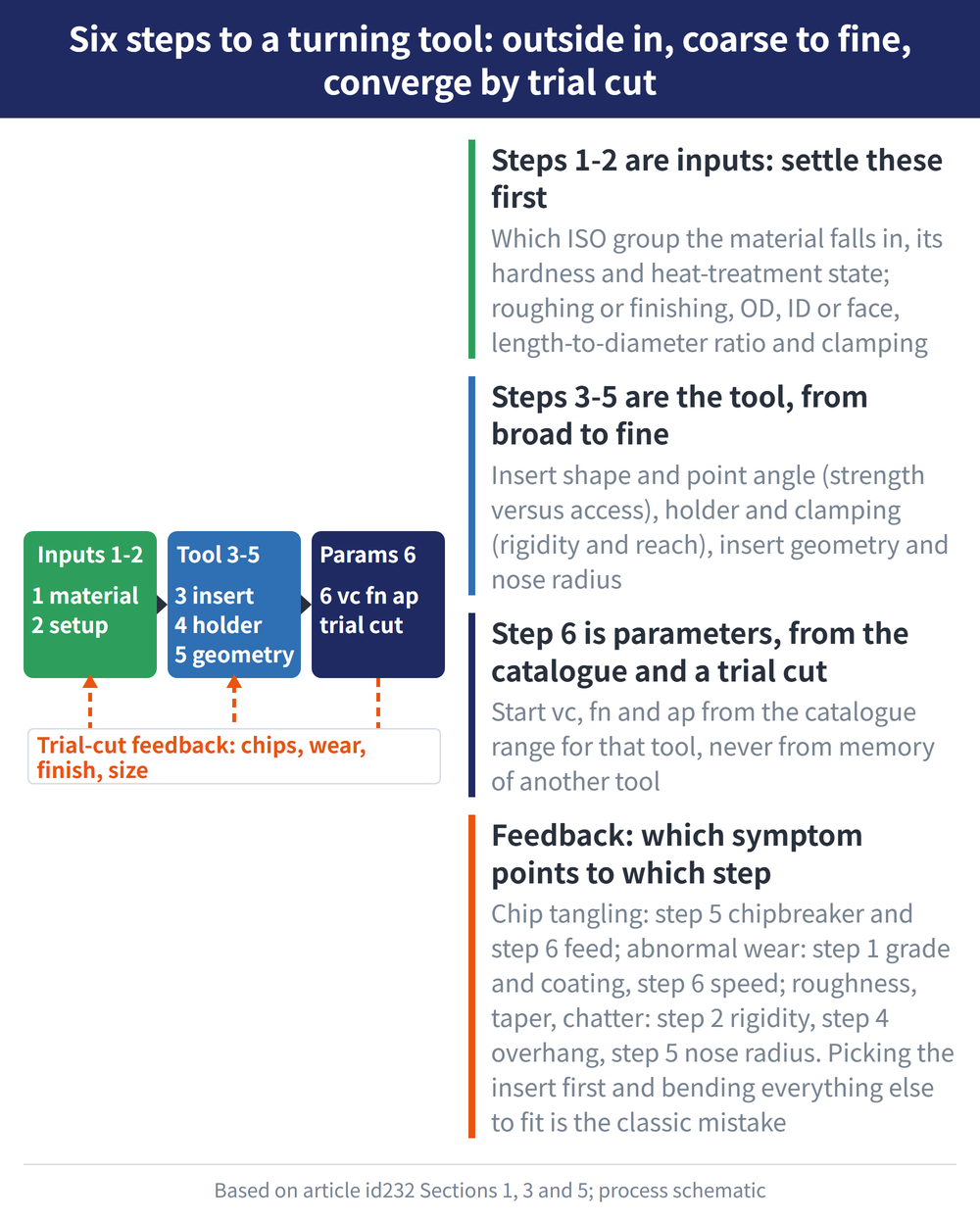
Selection is not a one-shot answer; it converges. After the first trial cut, look at three things.
| What the trial cut shows | Which step was not chosen well | Correction |
|---|---|---|
| Chips bird-nesting, over-long or powdery | Step 5, the chipbreaker does not match the operation, or step 6, the feed sits outside the breaking range | Adjust fn first, change the breaker second |
| Abnormal wear, chipping, built-up edge | Step 1, the grade and coating direction is wrong, or step 6, the cutting speed is off range | Work back from the wear pattern to grade and coating |
| Roughness, taper, burrs, chatter marks | Step 2, rigidity underestimated, step 4, overhang too long, or step 5, rε and feed do not match | Shorten the overhang first, then review rε |
Chip shape tells you whether the chipbreaker is right; the wear pattern tells you whether the grade and coating are right. They point at different steps, so do not change both at once. For reading chips, see the Turning Chip Control Guide.
This guide gives no specific values: vc, fn and ap always come from the catalogue and a trial cut. For the conversions see Turning Machining Formulas, and for the logic behind the settings see the Turning Cutting Conditions Guide.
The tables above give typical direction only; follow the catalogue or the relevant standard — not measurements taken by this site.
For the full reading guide on this topic, see Turning Toolpaths: The Complete Guide.
6. Frequently Asked Questions (FAQ)
Q: Do the six steps really have to be taken in order?
Yes. Each step's answer is the next step's input, so skipping one means narrowing the choice by guesswork. With practice the sequence runs fast, but the order does not change.
Q: If the insert is already on the shelf, can the process be run backwards?
You can use it, as long as it is recognised as a compromise. Still run the six steps once to confirm that the grade, shape and rε of that insert fall inside what the job needs.
Q: Is the order the same for roughing and finishing?
The order is the same; the weighting differs. Roughing leans on strength and rigidity in steps 3 and 4, while finishing leans on the edge and rε in step 5.
Q: Where do the cutting conditions come from?
Start from the recommended range in that tool's catalogue and close in with a trial cut. Do not carry over another tool's values from memory.
For the full reading guides on this topic, see Tool Life and Wear: A Complete Reading Guide and Insert Selection: A Complete Reading Guide.
For the full reading guide on this topic, see Turning: The Complete Guide.
Last updated: 2026-08-01