Logo

Turning Troubleshooting Guide | Tool Wear, Accuracy and Surface Issues

Turning Troubleshooting Guide | Tool Wear, Accuracy and Surface Issueshttps://cnc57.com/en/technical_information/Turning-Troubleshooting-Guidehttps://cnc57.com/api/cnc57/image/20260325140240336.jpgen2026-08-07
CNC57 Industrial Procurement Platform

Common turning failures include insert wear, edge chipping, unstable dimensions, poor surface finish and inadequate chip control. Their root causes lie mostly in tool material selection, cutting-condition settings, tool geometry and machine rigidity. By adjusting cutting speed, feed rate, depth of cut and coolant supply, and by optimising tool angles and clamping stability, you can raise machining quality and tool life, cut the reject rate and improve productivity.

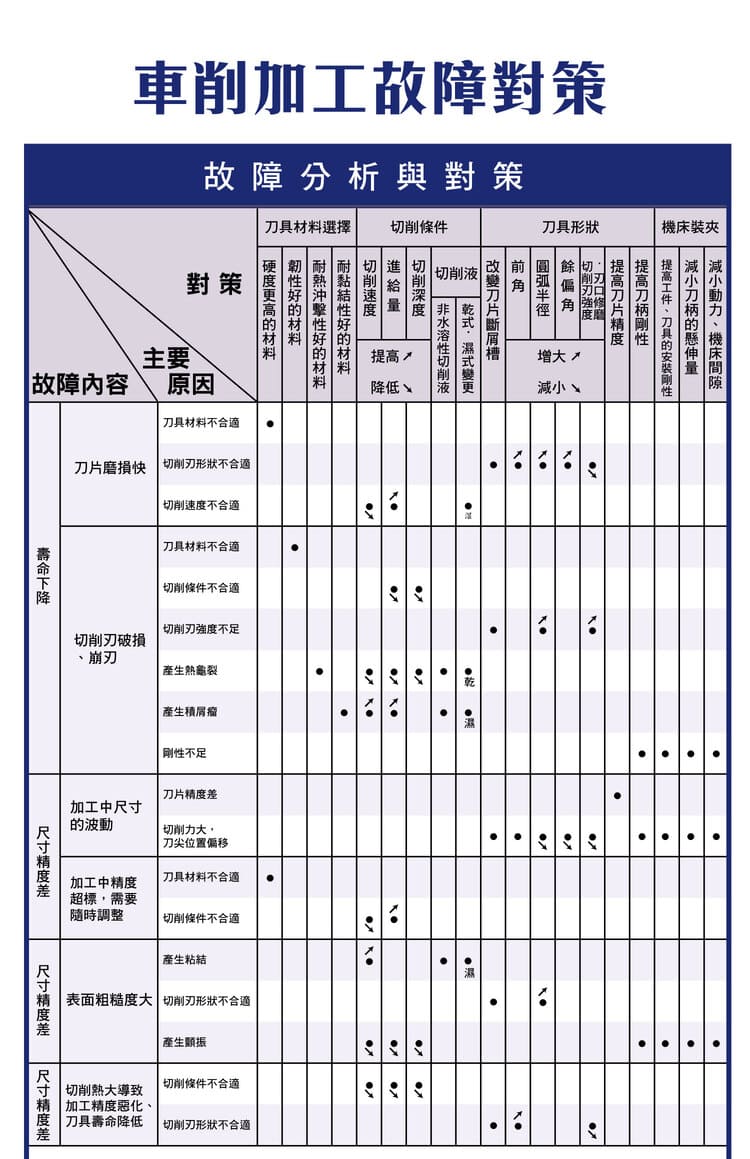
Turning troubleshooting matrix, upper half (chart in Chinese): tool life loss and dimensional-accuracy symptoms mapped to four countermeasure groups — tool material, cutting conditions, tool geometry, and machine and clamping rigidity.

Turning Failure Categories

Main problem types: reduced tool life, dimensional accuracy errors, poor surface roughness, burr and edge chipping, and chip-handling problems.

Key influencing factors: tool material, cutting conditions, tool geometry, and machine rigidity.


Tool Life Problems

Rapid insert wear

CauseCountermeasure
Unsuitable tool materialUse a harder or more wear-resistant grade
Cutting speed too highLower the cutting speed
Unstable cutting conditionsImprove the coolant supply

Tool breakage and edge chipping

CauseCountermeasure
Insufficient tool strengthUse a tougher grade
Excessive cutting loadReduce the feed rate
Insufficient rigidityImprove clamping stability

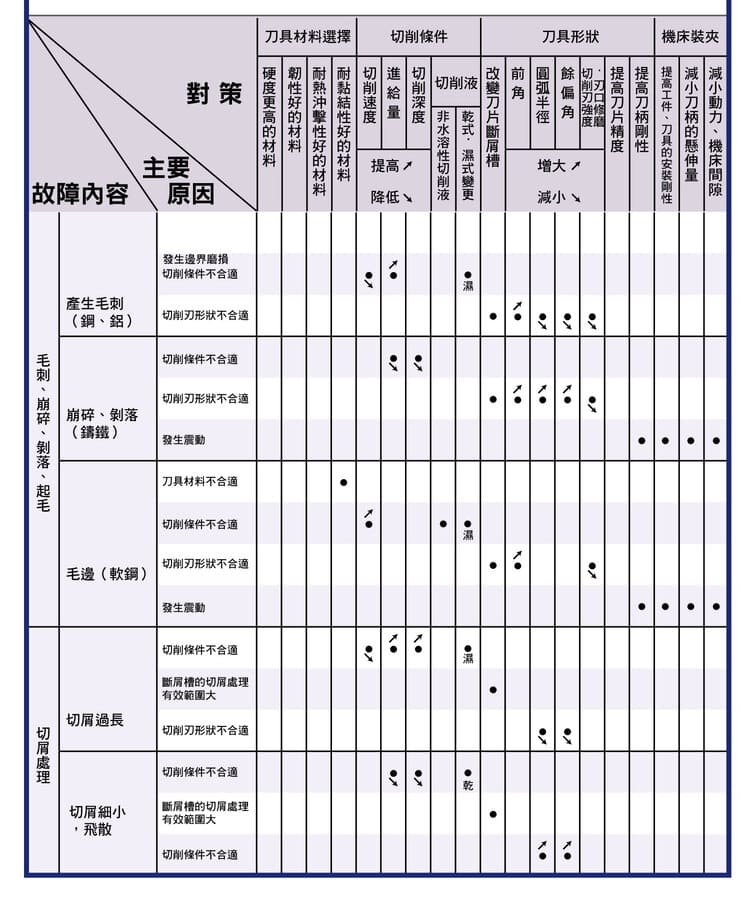
Turning troubleshooting matrix, lower half (chart in Chinese): burr, chipping and flaking, and chip-control symptoms mapped to the same four countermeasure groups — tool material, cutting conditions, tool geometry, and machine and clamping rigidity.

Dimensional Accuracy Problems

Dimensional variation during machining

CauseCountermeasure
Tool position offsetImprove tool-mounting accuracy
Varying cutting forceStabilise the cutting conditions

Insufficient machining accuracy

CauseCountermeasure
Unsuitable tool material or geometrySelect a suitable tool
Unstable cutting conditionsOptimise the cutting parameters

Surface Quality Problems

High surface roughness

CauseCountermeasure
Poor cutting conditionsReduce the feed rate
Tool wearReplace the tool

Built-up edge

CauseCountermeasure
Cutting speed too lowRaise the cutting speed
Cutting edge not sharp enoughUse a sharper tool

Vibration and surface defects

CauseCountermeasure
Insufficient machine rigidityImprove rigidity
Excessive tool overhangReduce the overhang

Thermal Deformation and Dimensional Change

Thermal deformation degrades accuracy

CauseCountermeasure
Cutting temperature too highApply cutting fluid
Lower the cutting speed

Shortened tool life

CauseCountermeasure
Heat build-upImprove cooling
Increased frictionOptimise the cutting conditions

Burr and Chipping Problems

Burr formation

CauseCountermeasure
Dull cutting edgeUse a sharper edge preparation
Poor cutting conditionsAdjust the feed rate

Chipping and flaking

CauseCountermeasure
Uneven cutting loadReduce the depth of cut
Insufficient tool strengthUse a tougher grade

Chip Control Problems

Chips too long

CauseCountermeasure
Insufficient chip-breaking abilityImprove the chip-breaker design
Adjust feed rate and depth of cut

Fine, scattered chips

CauseCountermeasure
Unstable cutting conditionsStabilise the cutting parameters
Improve cooling

Machining Optimisation Strategy

Tool selection: high-hardness and high-toughness grades, with suitable tool geometry.

Cutting conditions: control vc, f and ap.

Machine conditions: raise rigidity and suppress vibration.

Coolant strategy: use an appropriate cutting fluid.


Engineering Application Points

Key controls: tool material, cutting parameters, and clamping accuracy.

Machining results:

More stable dimensions
Better surface quality
Longer tool life

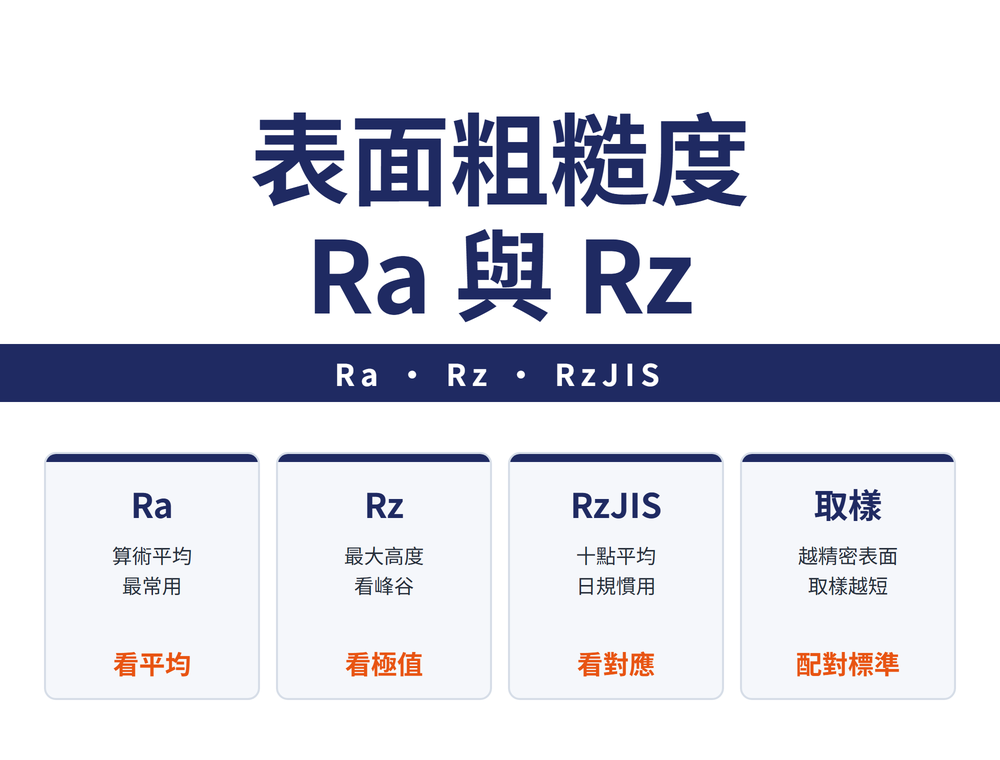
For measuring and cross-referencing surface roughness, see Surface Roughness Chart by Process.

FAQ

Why do turning inserts wear out so fast?

Usually unsuitable tool material, excessive cutting speed, or unstable cutting conditions; switch to a more wear-resistant grade, lower the speed, and improve cooling.

What causes unstable turning dimensions?

Often tool-mounting offset or varying cutting forces; improve mounting accuracy and stabilize the cutting parameters.

Why does built-up edge form on turned surfaces?

A cutting speed that is too low or a dull edge; raise the cutting speed and use a sharper tool to suppress it.

How do you control long or scattered chips in turning?

Long chips usually mean poor chip-breaking—improve chip-breaker geometry and adjust feed and depth; scattered fine chips mean unstable parameters—stabilize conditions and improve cooling.

For the full reading guide on this topic, see Surface Finish: A Complete Reading Guide.

Home1Technical Information2Turning Technical Guide3Turning Troubleshooting Guide | Tool Wear, Accuracy and Surface Issues4
標籤
Turning Tool
Insert
Chipping & Breakage
Built-up Edge
Surface Finish
Chip Evacuation
Tool Life
Heat & Burning
分享
推薦文章